
Artificial intelligence has become an important part of everyday work, education, marketing, programming, research, and business management. Tasks that previously required several hours can now be completed much faster with the help of modern AI assistants.
However, hundreds of AI tools are now available, making it difficult for users to decide which platform is suitable for their needs. Some tools are better for writing and brainstorming, while others are stronger in research, coding, data analysis, document processing, or integration with productivity applications.
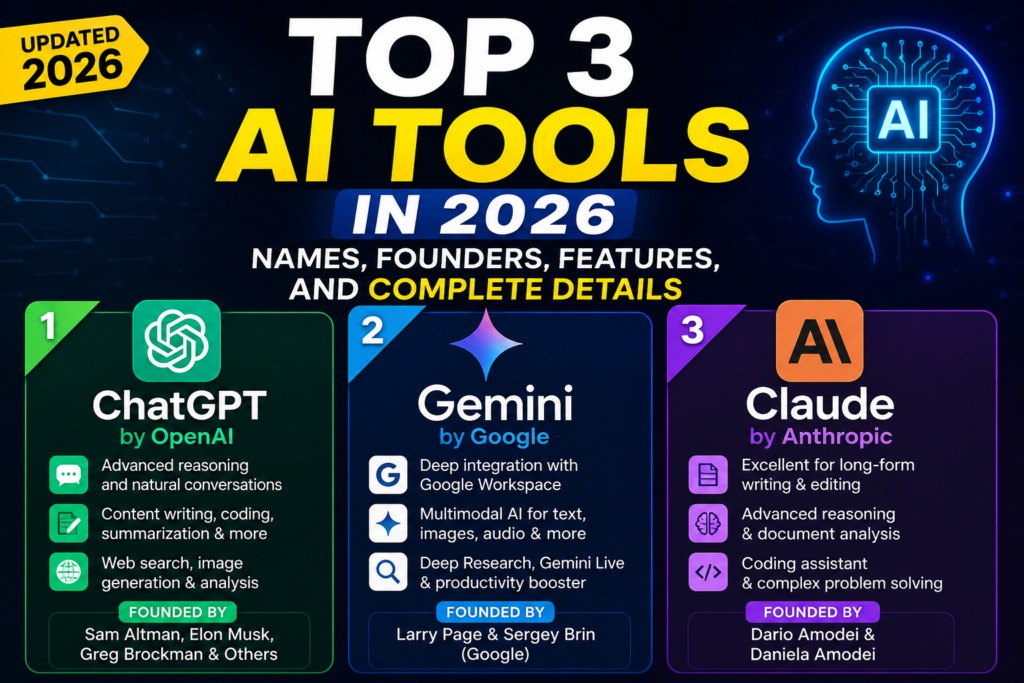
In 2026, three platforms continue to stand out because of their wide range of capabilities, strong AI models, and usefulness for individuals and businesses:
- ChatGPT by OpenAI
- Gemini by Google
- Claude by Anthropic
This article explains the names, developers, founders, features, benefits, limitations, and best uses of these three leading AI tools.
Quick Comparison of the Top 3 AI Tools
| AI Tool | Developed By | Best For |
|---|---|---|
| ChatGPT | OpenAI | General productivity, writing, research, coding, images, and business tasks |
| Google Gemini | Google Workspace, multimodal tasks, research, and connected productivity | |
| Claude | Anthropic | Long-form writing, complex reasoning, document analysis, and coding |
The best platform depends on the task. ChatGPT is a strong all-round assistant, Gemini is highly useful for people working within Google’s ecosystem, and Claude is particularly effective for thoughtful writing, complex documents, and structured problem-solving.
1. ChatGPT by OpenAI
What Is ChatGPT?
ChatGPT is a conversational artificial intelligence assistant developed by OpenAI. It allows users to communicate with AI through natural-language instructions.
People can use ChatGPT to write articles, create marketing plans, summarize files, analyze information, generate images, solve problems, write code, prepare reports, and explore new ideas.
OpenAI describes itself as an AI research and deployment company whose mission is to ensure that artificial general intelligence benefits humanity.
ChatGPT is one of the most versatile AI tools because it supports a wide variety of personal, educational, professional, and creative workflows.
Who Founded OpenAI?
OpenAI was established in 2015 by a founding group that included Sam Altman, Elon Musk, Greg Brockman, Ilya Sutskever, Wojciech Zaremba, and John Schulman.
It is more accurate to call these individuals founders of OpenAI rather than founders of ChatGPT. ChatGPT is a product created by OpenAI’s researchers, engineers, designers, and product teams.
Major ChatGPT Features in 2026
1. Natural Conversation
Users can communicate with ChatGPT using everyday language. They do not need advanced technical knowledge to ask questions, request explanations, or complete tasks.
ChatGPT can also maintain context during a conversation, allowing users to refine an answer without repeating every detail.
2. Content Writing and Editing
ChatGPT can help create:
- Blog articles
- Social media posts
- Product descriptions
- Email drafts
- Video scripts
- Ad copy
- Business proposals
- Website content
- SEO outlines
It can also rewrite existing content in a professional, friendly, persuasive, simple, or concise tone.
3. Web Research
ChatGPT can search the web and provide answers supported by relevant online sources. OpenAI introduced ChatGPT Search to combine conversational responses with timely web information and source links.
This capability is useful for researching recent developments, industry trends, competitors, news, products, and changing information.
4. File and Data Analysis
Users can upload documents, spreadsheets, presentations, and other supported files. ChatGPT can summarize information, explain tables, identify patterns, and help create reports.
This is particularly useful for business owners, marketers, researchers, students, and analysts.
5. Image Generation and Editing
ChatGPT can generate visual content from written instructions. OpenAI’s 2026 image-generation updates improved areas such as text rendering, multilingual content, realism, layouts, and creative control.
This can help businesses create concept visuals, social media designs, product presentation ideas, advertisements, and marketing assets.
6. Coding Assistance
ChatGPT can explain programming concepts, generate code, identify errors, improve existing code, and help developers plan software projects.
OpenAI’s newer models are also designed for complex tasks involving coding, research, and data analysis.
7. Voice Interaction
Voice functionality allows users to speak with ChatGPT rather than typing every instruction. This makes the tool more convenient for learning, brainstorming, accessibility, and hands-free use.
8. Projects, Custom GPTs, and Business Tools
ChatGPT includes productivity features such as Projects, custom GPTs, research capabilities, apps, agent-style functions, and organizational knowledge tools on supported plans.
Best Uses of ChatGPT
ChatGPT is suitable for:
- Digital marketers
- Content writers
- Graphic designers
- Developers
- Students
- Teachers
- Business owners
- Customer support teams
- SEO professionals
- Researchers
Advantages of ChatGPT
Its biggest advantage is versatility. One platform can support writing, coding, research, visual creation, brainstorming, file analysis, and business planning.
It is a practical choice for users who want one general-purpose AI assistant for many different tasks.
Limitations of ChatGPT
ChatGPT can occasionally provide incomplete, outdated, or incorrect information. Important facts should therefore be verified, especially in legal, medical, financial, and technical situations.
The quality of the answer also depends on the clarity of the user’s instructions.
2. Google Gemini
What Is Google Gemini?
Gemini is Google’s AI assistant and family of artificial intelligence models. It is designed to support writing, research, planning, learning, creativity, and productivity.
Google describes Gemini as a personal and proactive AI assistant. Its supported features include image generation, Deep Research, Gemini Live, Canvas, and Gems.
Gemini is especially useful for people who already use Google products such as Gmail, Google Docs, Google Drive, Google Sheets, Android, and Google Search.
Who Founded Google?
Google was founded by Larry Page and Sergey Brin in 1998.
However, Gemini itself was not founded by Larry Page and Sergey Brin. It was developed by teams at Google and Google DeepMind. Therefore, in a blog about AI founders, it is more accurate to describe Larry Page and Sergey Brin as the founders of Google, the company behind Gemini.
Major Google Gemini Features in 2026
1. Multimodal Understanding
Gemini can work with different types of information, including text, images, audio, video, and documents.
This allows users to upload content, ask questions about it, and receive relevant explanations or creative outputs.
Google’s newer Gemini developments continue to focus heavily on multimodal understanding and generation. Gemini Omni, for example, was introduced as a model combining different input formats such as images, audio, video, and text.
2. Google Workspace Integration
One of Gemini’s strongest benefits is its connection with Google’s productivity ecosystem.
Depending on the plan and availability, users can receive AI assistance while working with:
- Gmail
- Google Docs
- Google Sheets
- Google Drive
- Google Meet
- Google Calendar
For example, Gemini can help summarize email conversations, draft responses, organize information, and answer questions about inbox content. Google expanded Gemini-powered capabilities in Gmail during 2026.
3. Deep Research
Gemini’s Deep Research features can explore sources, organize information, and create detailed reports.
Google’s newer Deep Research systems support longer research workflows, visualizations, custom sources, and advanced analytical tasks.
4. Image and Media Creation
Gemini supports image generation and editing on eligible plans. Google is also expanding Gemini into video, audio, and other creative media workflows.
This is beneficial for marketers, content creators, designers, and businesses producing digital campaigns.
5. Gemini Live
Gemini Live enables more natural voice-based conversations. Users can discuss ideas, ask follow-up questions, rehearse presentations, or receive explanations without relying entirely on typed prompts.
6. Gems
Gems are customized versions of Gemini designed for particular tasks or instructions.
A business could create a Gem for content planning, customer service responses, product descriptions, study support, or internal procedures.
7. Coding and Technical Assistance
Gemini can generate, review, explain, and improve code. It is also useful for technical research, software planning, and problem-solving.
Google’s 2026 Gemini models include specialized reasoning options intended for complex scientific and engineering workflows.
Best Uses of Google Gemini
Gemini is most suitable for:
- Google Workspace users
- Android users
- Students and teachers
- Researchers
- Content creators
- Business teams
- Developers
- Gmail-heavy organizations
- People managing documents in Google Drive
Advantages of Gemini
Gemini’s main advantage is its connection with Google services. Users who already manage email, files, calendars, documents, and spreadsheets through Google may find Gemini especially convenient.
Its multimodal abilities also make it suitable for research, visual content, and mixed-media tasks.
Limitations of Gemini
Some features may depend on the user’s country, device, subscription, or Google account type. Access to advanced models and tools may also vary by plan.
Like other AI assistants, Gemini can make mistakes, so users should verify important information.
3. Claude by Anthropic
What Is Claude?
Claude is an AI assistant developed by Anthropic, an AI safety and research company.
Anthropic describes Claude as an AI for problem-solvers that can analyze data, write code, create content, and help users think through difficult work.
Claude is widely used for long-form writing, detailed document analysis, structured reasoning, coding, editing, and professional communication.
Who Founded Anthropic?
Anthropic was founded in 2021 by former OpenAI employees, including Dario Amodei and Daniela Amodei, along with other early team members.
Dario Amodei serves as a leading executive figure at Anthropic, while Daniela Amodei has also played a major role in building and managing the company.
Anthropic describes itself as an AI safety and research company focused on building reliable, interpretable, and steerable AI systems.
Major Claude Features in 2026
1. Long-Form Writing
Claude is particularly effective at producing natural, organized, and detailed writing.
It can help create:
- Reports
- Articles
- Business documents
- Essays
- Research summaries
- Proposals
- Brand guidelines
- Professional emails
- Scripts
It is also useful for maintaining a consistent tone across lengthy content.
2. Document Analysis
Users can upload large documents and ask Claude to summarize, compare, extract, explain, or reorganize the information.
This makes Claude useful for researchers, legal teams, consultants, students, managers, and companies working with detailed reports.
3. Complex Reasoning
Claude is designed to break complicated tasks into understandable steps. It can examine arguments, compare options, identify weaknesses, and help users improve their thinking.
Anthropic emphasizes building AI systems that people can rely on and that can be controlled and understood more effectively.
4. Claude Code
Claude Code supports developers with coding, debugging, software planning, and development workflows.
Claude is available in development environments including terminals, Visual Studio Code, JetBrains tools, and desktop applications.
5. Artifacts
Claude can create interactive outputs such as documents, diagrams, code, visualizations, and other shareable materials.
This can make complex information easier to review and present.
6. App and Workplace Integrations
Claude supports desktop and mobile access, along with integrations or extensions for tools such as Chrome, Slack, Excel, PowerPoint, and Word.
These connections make it useful for professional teams that want AI assistance inside their existing workflows.
Best Uses of Claude
Claude is suitable for:
- Writers and editors
- Researchers
- Programmers
- Consultants
- Legal and policy teams
- Students
- Business analysts
- Companies handling large documents
- Professionals creating detailed reports
Advantages of Claude
Claude’s strongest qualities include clear writing, careful reasoning, document handling, and professional communication.
It is a strong option for users who regularly work with detailed information or need organized, thoughtful responses.
Limitations of Claude
Claude may not offer the same broad combination of consumer image tools and general-purpose creative features available in some competing platforms.
Feature availability can also differ according to the user’s subscription and region.
Which AI Tool Is Best in 2026?
There is no single tool that is best for every person.
Choose ChatGPT when you need an all-round AI assistant for content, research, coding, images, business planning, and file analysis.
Choose Google Gemini when your work depends heavily on Gmail, Google Docs, Google Drive, Android, and other Google services.
Choose Claude when you need long-form writing, document analysis, structured reasoning, or advanced coding assistance.
Many professionals use more than one platform. For example, they may use Gemini for Google Workspace tasks, Claude for reviewing a detailed report, and ChatGPT for marketing content, research, and visual creation.
Final Thoughts
ChatGPT, Google Gemini, and Claude are among the most useful artificial intelligence tools available in 2026. Each platform offers powerful capabilities, but their strengths are different.
ChatGPT provides a broad range of tools for everyday and professional work. Gemini offers powerful integration with Google’s ecosystem and multimodal AI capabilities. Claude stands out for detailed writing, complex analysis, documents, and coding.
Before choosing a platform, identify the tasks you perform most frequently. The best AI tool is not necessarily the one with the longest feature list. It is the one that fits naturally into your workflow, saves time, improves quality, and helps you achieve better results.
AI should also be treated as an assistant rather than a replacement for human judgment. Review important outputs, verify factual information, protect confidential data, and refine AI-generated content before publishing or using it professionally.
Frequently Asked Questions
1. What are the top three AI tools in 2026?
Three leading general-purpose AI tools in 2026 are ChatGPT by OpenAI, Gemini by Google, and Claude by Anthropic.
2. Which AI tool is best for content writing?
ChatGPT and Claude are both strong for content writing. ChatGPT is highly versatile, while Claude is especially useful for long-form, structured, and professional writing.
3. Which AI tool is best for Google Workspace?
Gemini is generally the most suitable option for users who regularly work with Gmail, Google Docs, Google Drive, Google Sheets, and other Google products.
4. Can these AI tools provide incorrect information?
Yes. Every AI assistant can generate inaccurate, incomplete, or outdated information. Users should verify important claims before making business, legal, medical, or financial decisions.
5. Are ChatGPT, Gemini, and Claude free?
All three platforms may offer free access, but advanced models, higher usage limits, premium integrations, and business features can require paid subscriptions. Plan availability and features may change over time.